To recap, an FTP server on PS3 provides access to all files on the internal hard disk of the PS3 and all the devices connected to it.
This tutorial will give you access to all given on your PS3 from your PC to make backups of your backups etc ...
Prerequisite:
* Download OpenPS3FTP: openps3ftp-v2.1.1.zip
* Unzip the downloaded archive, copy / paste the package that matches your version on a USB stick formatted in FAT32
* Plug your USB key on your jailbroken console and go Games> Install_package_files and install OpenPS3FTP
Once the installation is complete, the menu of the XMB games (console menu) you should see the logo OpenPS3FTP, docross over to launch homebrew, you should see the IP address used by the console (eg address: 192.168. 1.10), and let the open (note: if the screen goes BLACK, this is normal it is idle to TRIANGLE to redisplay the screen)
On your PC, download and install Filezilla. => FILEZILLA HERE (note: choose the version for your computer, Windows, Mac, Linux, etc ...)
Launch Filezilla in the "Host" box: write the IP address given by OpenPS3FTP and the "Port" box put 21 in the box Login to: root / in the Password box set: openbox
Then click on "Quick Connect"

If the connection is happening correctly you should find like the picture below:
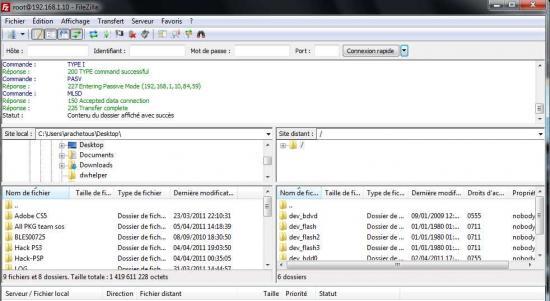
Left files on your PC and right files on your PS3. careful not to do anything . Çe with software you can edit files, copiers or rename see clear so beware not to do what imorte in the HDD of the PS3, if you have a doubt, ask me!
Here you set the PC / connextion PS3, you have to transfer your game or your change.
Info: the side of the console in filezilla, dev_hdd0 corresponds to the internal hard disk of the PS3 and dev_usb0 corresponds to external media are relés to the console.
If you want to ask questions or respond to this topic go to the Forum or place to leave a comment, select "be warned of an answer"


No comments:
Post a Comment