Here's how to cut your file ps3 games over 4GB to put on an external hard drive formatted in FAT32

We will show you two methods:
Method 1
- Download software (works on all windows platform) split4G.rar
NOTE => You can also use these programs work the same way wholesale => PS3 PSARC 1.2 (771 KB) (x64: here )
- Unzip the downloaded above and install the software, so far, it will 
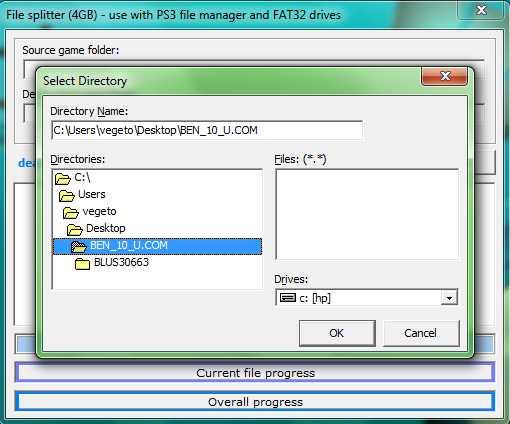
- Run the software and a window opens, click on the bar that is below Source game folde r search your computer BLESxxxxx the folder that contains the game file to cut like the picture below for:
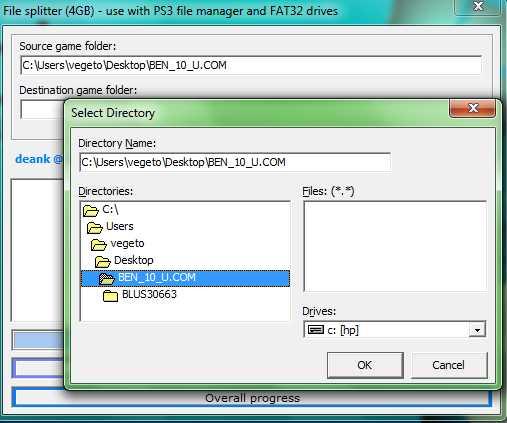
- Then click on the bar that is below Destination game folde r , a window opens for you to select the output directory, I suggest you take the same as the one that contains your game:
- That, press START and cutting starts is long, be patient and do not close the software before you make SUCCESFULL SPLIT!
NOTE: The file is too large for the copy on your external hard drive will be kept in the file BLESxxxxx your game, when you copy / paste on your external hard drive you will see a message saying that this file is too large , made and ignore the continuous copying without problem.
You can simply delete the file that is too big BLESxxxxx directly in your file but do not be fooled.
Once you have copied to your external hard drive, you need to copy it back to the internal hard drive in your PS3 using your backup manager, this is mandatory for files that have been cut or glued when copying to the house. (USB0 => HDD0)
Method 2
Prerequisites:
- Software: OpenSplit v1.0: OpenSplit v1.zip Note: This software is kind of JAVA
- Software: "Java" environment for all operating system (windows, mac, linux, solaris.) which is obliged for use OpenSplit v1.0.
- UnManager backup available on this page => HERE
- External HDD formatted in FAT32 or USB Key
- A ps3 jailbreak louise.
Begin:
1 - Launch OpenSplit v1.0 and Check the [Do not delete splitted BIG / merged .666 xx files box in red on the image of poor quality sorry.

2 - Have locate the file to cut it into parts.

3 - Click on [Split BIG files to .666 xx] and navigate to the game folder and click Open
+ For example BLES00868 as on photoci OpenSplit below and find the file

4 - That the file is automatically and the selection procedure of copure latter has begun.

5 - That the procedure of vien termiée successfully we must wait to see if message up before closing the program " Done with all jobs! "
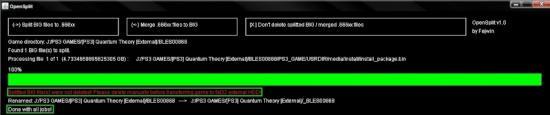
6 - Maintenent you can go to the game folder and then go to the 4GB file. There are new file .666 xx files are used because in going to say goodbye to the original file.
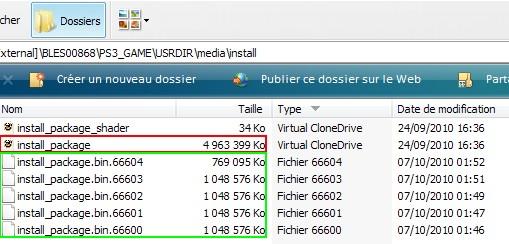
7 - After you will need to right click on the file and 4GB Cut and you put it outside the game folder, leaving the file .666 XX

8 - Maintenent you need to copy the folder games on External HDD or USB key in the suivantX path: \ GAMEZ
9 - Turn on your PS3 and connect the HDD External USB or exactly where you have already copied the game then go to Open Manager (the version used Open Manager v1.14.2 en) posted here is the game Key: QUANTUM THEORY
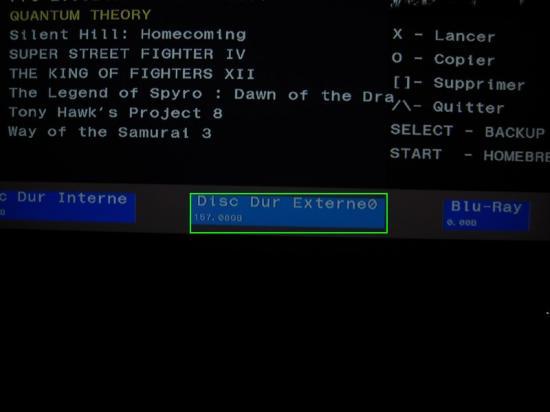
10 - The Game and SD External maintenent you must copy it to the Internal SD Selected the game then click circle O and choose YES

11 - The procedure for copying starts, wait until the file over 4GB be compiled and that the game be copied to the internal hard drive after you have two copies of the game show on Open Manager, selected the copy on the External Hard Drive and delete it, and then you can start the copy of the game and played the Internal Hard Drive.
NOTE 1 : cetains games do not work with this method, the 80010017 error code may be displayed, or "EBOOT.BIN is not valid"
NOTE 2: do not start copying the external hard drive because it is cut by OpenSplit file v1.0 therefore unusable, only the copy you made of the Via Open your file manager on the internal hard drive can be used as the backup reaffixable manager files for copying to the internal hard drive.


No comments:
Post a Comment